Bangladesh Railway eTicket Login — Website and Rail Sheba App Guide
If you are looking for a Bangladesh Railway eTicket Login guide, you’ve come to the right place. Whether you want to sign in through the official website or the Rail Sheba app, the process is simple once you know the correct steps. This guide explains how to log in, recover a forgotten password, solve OTP problems, and keep your account secure while booking Bangladesh Railway tickets online.
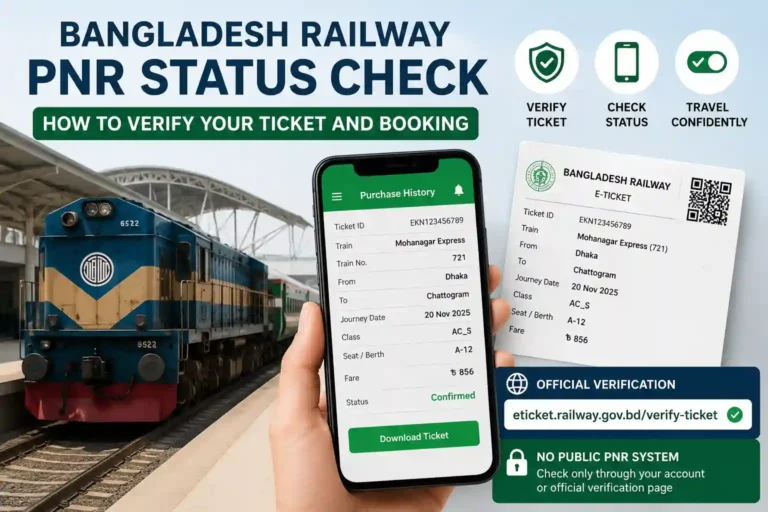
If you already have an account and want to check a confirmed booking, read our Bangladesh Railway PNR Status Check guide to verify your ticket and booking status.
| Login — Quick Facts Website: eticket.railway.gov.bd App: Rail Sheba — same account, same login, available on Android and iOS Login Credentials: Registered mobile number + password To Register: Mobile number, email, and NID or passport number required Important: The real system never asks for your OTP over phone or chat |
Website or Rail Sheba App — Are They Actually the Same Thing?
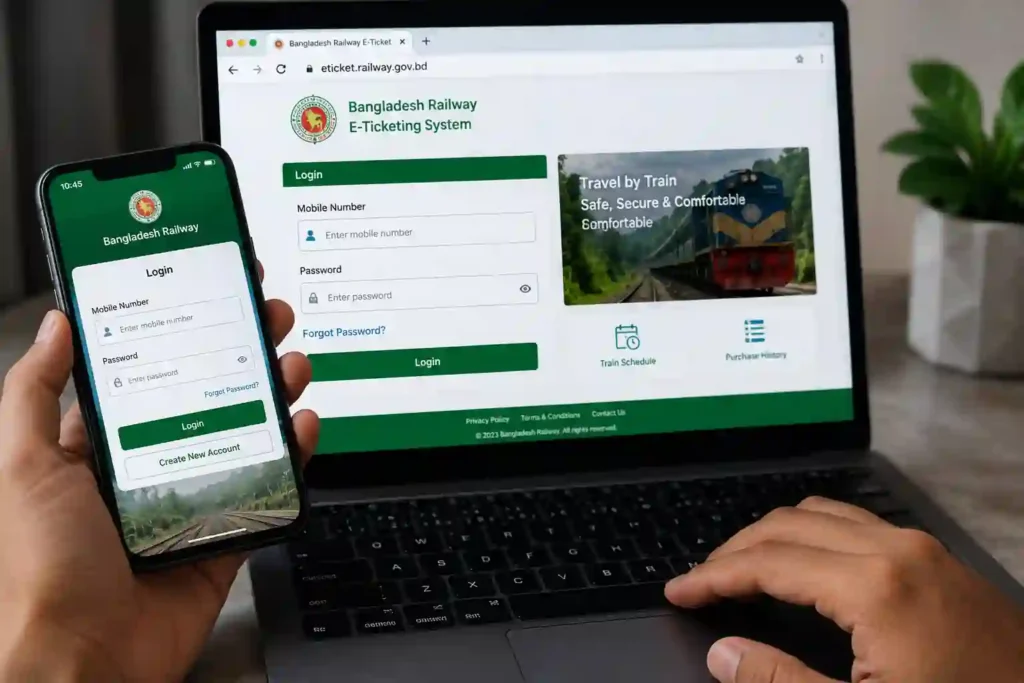
Yes, essentially. Rail Sheba is the official Bangladesh Railway mobile app, and eticket.railway.gov.bd is the website — both run on the same backend system, the same account database, and the same login credentials. Register or book on one and the other recognises you instantly. There is no separate Rail Sheba account to set up if you already use the website, and vice versa.
Your Bangladesh Railway eTicket Login works exactly the same on both the official website and the Rail Sheba app. Once you create an account, you can use the same mobile number and password to access your bookings from either platform.
| Website (eticket.railway.gov.bd) | Rail Sheba App | |
| Login credentials | Mobile number + password | Same mobile number + password |
| Purchase history | Visible | Visible — identical list |
| Best for | Booking from a desktop or laptop | Booking on the move, faster repeat bookings |
| Requires internet | Yes | Yes |
The practical choice between them usually comes down to convenience rather than capability — if you are at a computer already, the website is faster to navigate; if you are out and need to book on your phone, the app saves you from a mobile browser squeezing a desktop layout onto a small screen.
Registering an Account — What You Need Before You Start
Before using the Bangladesh Railway eTicket Login, you must create an account with your mobile number, email address, and NID or passport details. Registration only takes a few minutes and gives you access to online ticket booking and purchase history.
If you do not already have an account, you need to register before any login screen will let you in. The process is the same whether you start on the website or in the app, and only takes a few minutes:
Have your documents ready
You will need a working mobile number you can receive an OTP on, a valid email address, and your National ID (NID) or passport number. Having these typed out beforehand speeds things up considerably.
Go to the registration page
On the website, this is at eticket.railway.gov.bd. In the Rail Sheba app, the registration screen appears automatically the first time you open it.
Fill in your details and verify
Enter your name, mobile number, email, and NID/passport number exactly as they appear on your official documents. An OTP is sent to your phone — enter it to verify the number.
Set a password
Choose something you do not reuse on other websites. This account holds your personal ID details and payment history, so treating the password with the same care as a banking app login is worth the extra effort.
Logging In — Step by Step
The Bangladesh Railway eTicket Login process is the same whether you access your account from a computer or the Rail Sheba app. Simply use your registered mobile number and password to sign in securely.
On the Website
Go to the official Bangladesh Railway e-ticket portal and sign in using your registered mobile number and password.
Make sure you are on the official URL. If you arrived via a link from social media or a search ad and the address looks different, close it and type the address yourself.
Enter your mobile number and password
Use the exact mobile number registered to your account — not an alternate number, even if it belongs to you.
Solve the captcha if it appears
The site runs Cloudflare protection, so you may occasionally see a quick “I’m not a robot” checkbox or an image-selection challenge before you can proceed. This is a standard security check, not a sign of a problem — tick the box or follow the prompt, and it clears in a few seconds.
Submit and you are in
Once logged in, you have full access to train search, booking, purchase history, and your saved profile details.
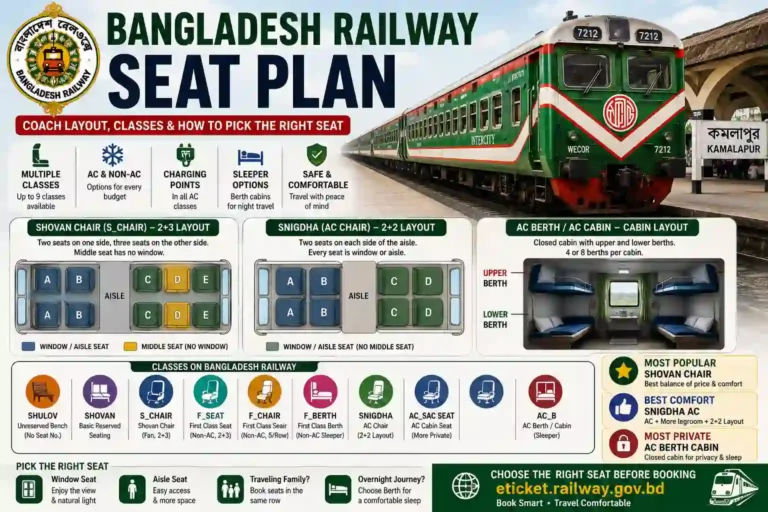
Once you have logged in successfully, you can also view your Bangladesh Railway Seat Plan to understand your coach and seat details before travelling.
On the Rail Sheba App
Open the app
Download it only from the official Google Play Store or Apple App Store listing — search “Rail Sheba” and confirm it is published by Bangladesh Railway before installing.
Tap Login and enter the same credentials
Your mobile number and password work identically here. There is no separate signup needed if you already registered on the website.
Allow notifications if prompted
This lets the app alert you about booking confirmations and any account activity, which is useful if you book regularly.
Common Login Problems and How to Fix Them
Most Bangladesh Railway eTicket Login problems are easy to fix. Issues such as forgotten passwords, OTP delays, or login errors can usually be resolved by following the official recovery steps instead of creating a new account.
Keeping Your Account Secure
Always complete your Bangladesh Railway eTicket Login through the official website or the Rail Sheba app. Avoid logging in through unofficial links shared on social media or unknown websites, as they may be designed to steal your personal information.
An account tied to your NID and payment methods is worth protecting properly, and the habits that keep it safe are simple but easy to skip when you are in a hurry to book before seats run out.
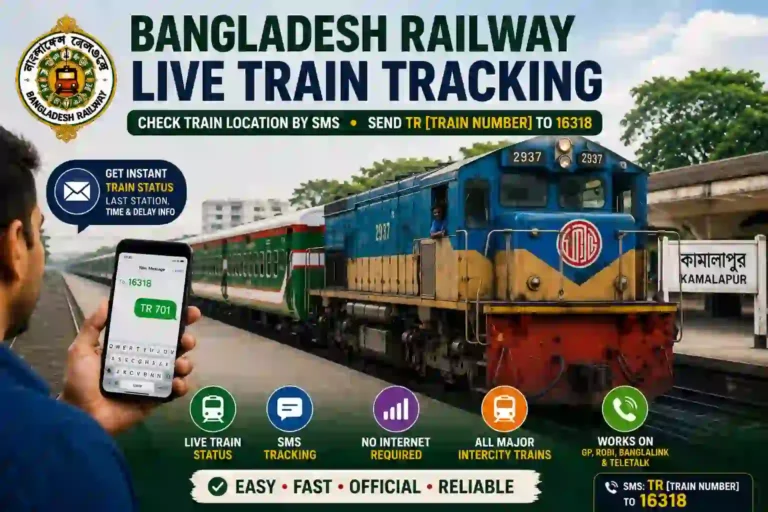
Double-check the website address every time, particularly if you reached the login page through a link rather than typing it yourself. The only official portal is eticket.railway.gov.bd — anything else asking for the same login details is not the real system. Once your account is secure, you can also use our Bangladesh Railway Live Train Tracking guide to check your train’s real-time running status before leaving for the station.
A successful Bangladesh Railway eTicket Login gives you access to your bookings, purchase history, ticket downloads, and account settings. For your security, always sign in through the official website or the Rail Sheba app.
Frequently Asked Questions
| Q1: Are Rail Sheba and eticket.railway.gov.bd the same account? A: Yes. They run on the same backend system and the same login credentials. If you register or book on one, the other recognises your account instantly — there is no separate signup needed. |
| Q2: What do I need to register a Bangladesh Railway account? A: A working mobile number you can receive an OTP on, a valid email address, and your National ID (NID) or passport number. The registration takes only a few minutes once you have these ready. |
| Q3: I forgot my password — how do I get back in? A: Use the Forgot Password link on the login screen. An OTP is sent to your registered mobile number, and entering it lets you set a new password immediately without contacting support. |
| Q4: Is it safe to download the Rail Sheba app? A: Yes, as long as you download it from the official Google Play Store or Apple App Store listing published by Bangladesh Railway. Avoid any third-party app store listing or sideloaded version claiming to be Rail Sheba. |
| Q5: Why does my OTP keep failing to arrive? A: It is usually a delivery delay during high-traffic periods, or an SMS-filtering app silently blocking it. Wait a couple of minutes and check your signal before requesting it again. If the problem persists across multiple attempts, contact the official helpline rather than an unofficial support channel. |
| Q6: Can Bangladesh Railway staff ask for my OTP over the phone? A: No. The legitimate system never requests your OTP through a phone call or chat message. Anyone asking for it that way, regardless of what they claim to represent, is attempting a scam — do not share it. |
| Q7: Why am I seeing a captcha or “I’m not a robot” check when logging in? A: The website uses Cloudflare for security, which occasionally shows a quick verification step — a checkbox or simple image selection — before letting you through. This is normal and not a sign of an account problem. If it keeps failing repeatedly, try a stable internet connection and avoid using a VPN, which can sometimes trigger extra checks. |
| Q8: My account got locked after a few failed login attempts — what now? A: After several incorrect password attempts, the system temporarily locks the account as a security precaution. Do not keep retrying the same password. Use the Forgot Password option to reset it via OTP — this unlocks the account immediately, rather than waiting out the lockout period. |
Bangladesh Railway eTicket Login – Final Thoughts
Using the Bangladesh Railway eTicket Login is the easiest and most secure way to manage your railway bookings online. Once you sign in, you can search trains, book tickets, view your purchase history, download your e-tickets, and manage your account from both the official website and the Rail Sheba app using the same login credentials.
If you ever experience problems such as OTP delays, forgotten passwords, or login errors, most issues can be resolved by following the official recovery process instead of relying on unofficial websites or social media links. Always access your account through the official Bangladesh Railway e-ticket portal to protect your personal information and booking details.
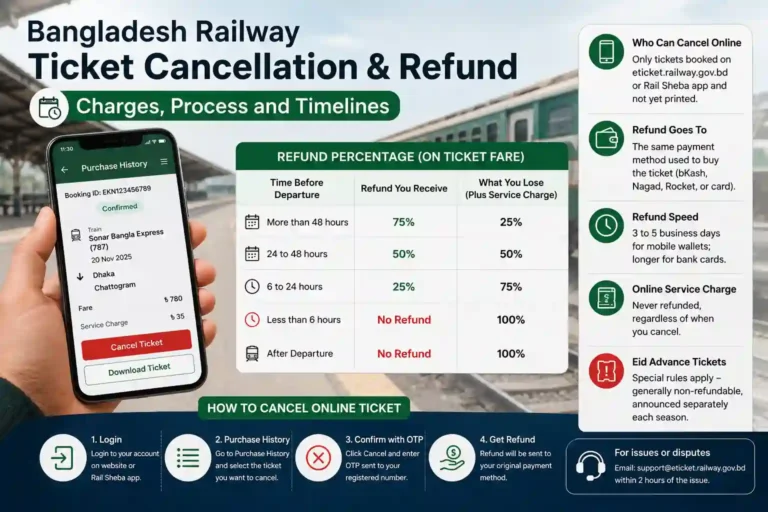
If you are planning your next journey, you can also explore our Bangladesh Railway guides for train schedules, popular routes, ticket cancellation rules, seat plans, live train tracking, and other helpful travel resources.